Feather Theory
A one-handed steno theory by ErisMigrating to http://erisshaw.com/steno.html.
Getting started
Setup
You will need some plugins to use Feather.In Plover, navigate to the Plugins Manager like this:
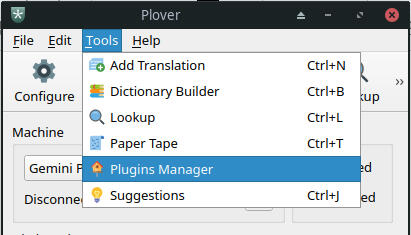
Install plover-stenotype-extended and plover-python-dictionary.
After installing the plugins, restart Plover.We now need to mess with the stenotype extended plugin a bit. Open the config folder:
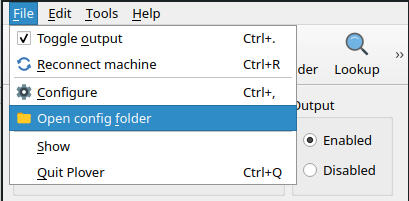
Navigate to the site-packages folder.
Windows: plover/plover/plugins/win/Python39/site-packagesIn this folder should be a file named extended_stenotype.py
Replace this file with the extended_stenotype.py file from the Feather github repo.Now open the Configure menu:
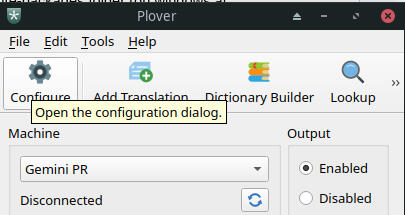
Find the System tab and switch the system to Stenotype Extended:

Now go to the Machine tab. You should see something like this:
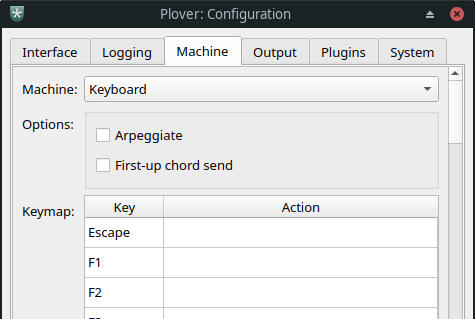
Use the keymap editor to assign the Feather's keys to keys on your keyboard.
The Keys
Feather has 10 keys: T, F, D, M, S, R, O, A, E, U
When you go to set keys in the Keymap, you will see other keys in there as well due to the constraints of the Stenotype Extended plugin. You can ignore anything in there that isn’t part of the 10 keys listed above.Pay close attention to the hyphens: S- and -S are different! Every Feather key has the hyphen to the right of the letter, so they are:
T- F- D- M- S- R- O- A- E- U-
Layouts
This is a picture of my keyboard with my personal layout of the Feather keys:
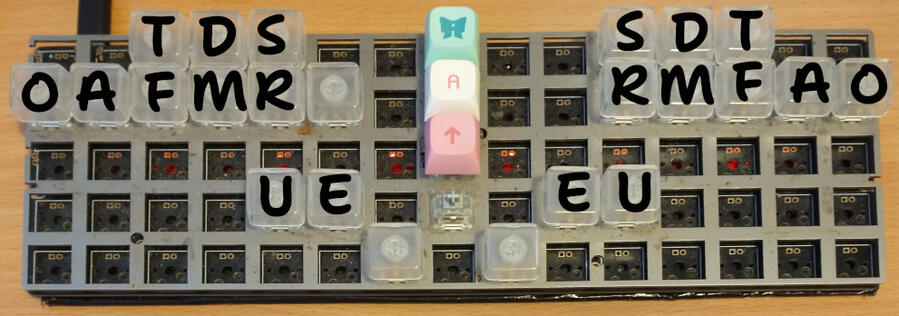
This is not the standard or default Feather layout though. In fact, there is no standard Feather layout at all because everyone’s hands are different. I also have two copies of the Feather keys on my layout, but this is not required to use the theory.
Due to the fact that 10 keys is an incredibly tight space to try to cram all of the English language, pretty much every possible combination of keys gets used so bear that in mind if you’re creating a layout.Most consonants are 2x1, 1x2, or 2x2 rectangles on my layout. For this reason I would recommend that consonant keys that are close together on my layout stay close together on yours if possible. Consult the Cheat Sheet if you want more specifics.Experiment with your layout and see what works!By convention, when we are talking about combinations of Feather keys or writing Plover dictionaries, we use the order TFDMSROAEU. This has no significance in the theory, but makes communication and sharing dictionaries much easier.
Cheat sheet
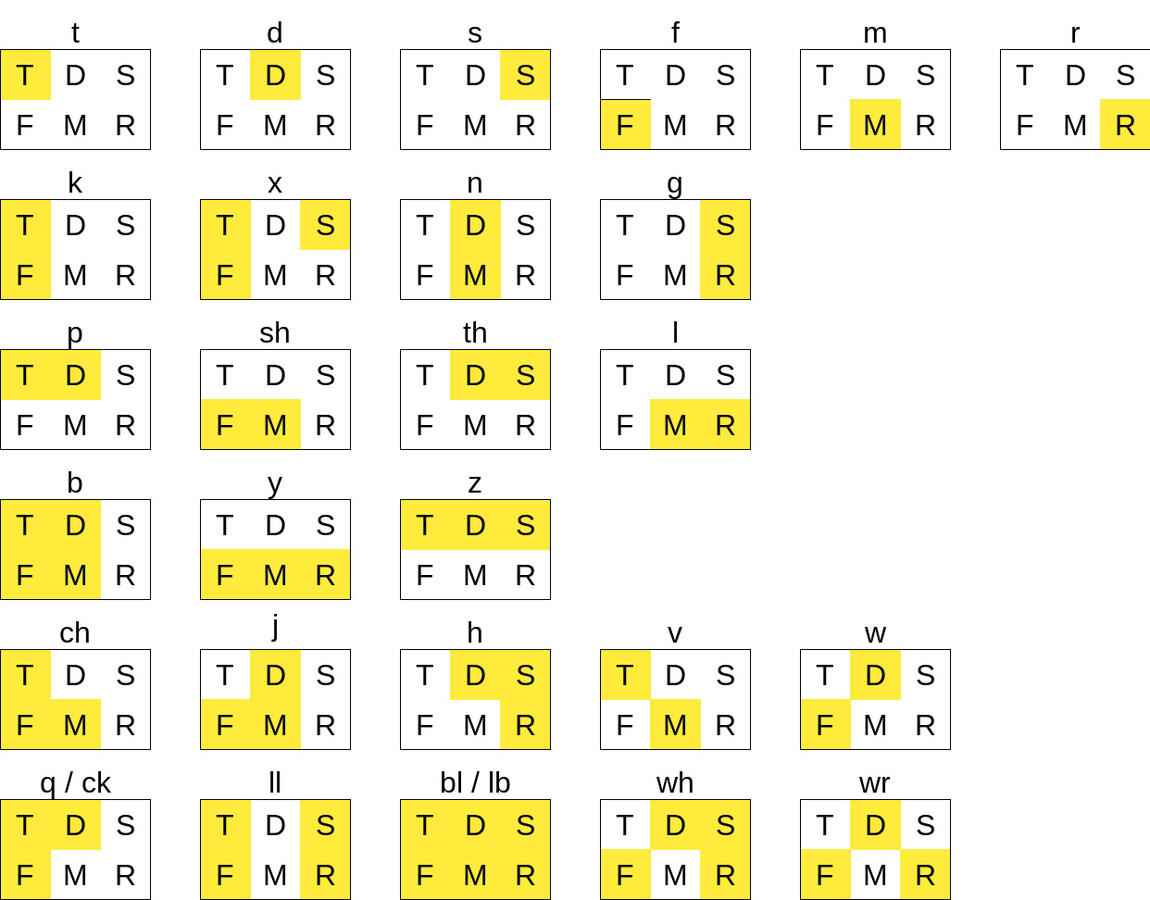

(Cheat sheet is not done yet)
1 – Writing words
Before you get started, make sure you have the keymap set up properly and the feather-starter.json and feather-mandatory-briefs.json dictionaries from the feather github repo imported into Plover. Order your dictionaries so that user.json is above the feather dictionaries, and remove any other dictionaries from the dictionary stack.
Starting steno…
In stenography, the way the keyboard or machine is used is to hold down one or more keys at the same time, and then release those keys at the same time. This action is called a stroke.General best practices for stenography strokes:
Only press keys down once you know exactly what stroke you are performing.
Press every key in a stroke at the same time, and release the keys at the same time.
Use the smallest possible force to press the keys down.
Minimise the delay between pushing the keys down and releasing them.
Good technique becomes important later once you start to gain familiarity and speed. You are going to be performing a lot of steno strokes, so it’s important that they take the least effort and time possible.That said, when you start out it’s going to feel awkward and clumsy. There may be certain combinations of keys that you really struggle with, or theory rules that just won’t stick in your mind. This is normal! You are learning an entire new method of interfacing with a computer. Getting competent at stenography takes hard work and practice, but in return you get a cool skill!If you feel like a noob, you’re doing something right.
Writing your first words
Let’s get down to business. Open a fresh document in a text editor and get Plover ready.
To write the word ‘red’ will take two strokes:
R and E simultaneously for the first stroke,
and then just D on its own for the second stroke.Try it out. After the first stroke, Plover should output the text ‘RE’ and then after the second, it should remove the ‘RE’ and replace it with ‘red’.We call RE/D the outline for 'red'. The Feather starter dictionary has an entry mapping the outline RE/D to the text 'red'.
Exercise 101
Write the following words by stroking their outlines:
RE/D red
FE/D fed
FA/D fad
FA/T fat
MA/T mat
ME/T met
ME/S mess
MO/S moss
TO/S toss
TO/R tor
DO/R door
SU/M sum
RU/M rum
RA/M ram
RA/D rad
Doing this exercise is going to put a bunch of text into your document. To keep things organised and allow you to correct any errors, you'll want to know these outlines:
OAE undo the previous stroke
FSR go onto a new line
Summary
In lesson 1 we learned:
Steno strokes
The Feather keys
T F D M S R O A E UOutlines
Writing words
Use the following exercises to get acclimated to the Feather keys, and move on to the next lesson once you're comfortable navigating the layout purely by feel.It’s ok if it takes a long time to get your hands in the right place, and remember to get everything in position before the keys go down. Speed is irrelevant at this stage, focus on getting it right every time.Always remember that you get good at what you do. If you implement proper stroking technique in your practice, you will get good at proper technique. Implement poor technique, and you will get good at using poor technique.
Exercise 102
Write the following sequences of words:
tat tar tot toss tor tut tuff
fat faff fad fam far fed fess fuss
dad dam dot door dud
mat mad mass mar mod moss met mess mutt mud
sat sad sass sod set sud sum sus
rat rad ram rot rod ref red rut rum
Exercise 103
Try them in a different order:
rut rot rat set sat mutt met mat dot fat tut tot tat
ruff ref faff tuff
rod rad sud sod sad mud mod mad dud dad fed fad
rum ram sum dam fam
sus sass mess moss mass toss
door tor
2 – In theory
You may have noticed in the previous lesson that there is not always a one-to-one correspondence between the letters you press and the letters in the word that pops out. This is because the underlying theory rules governing the dictionary are phonetic.Keys are used for syllables with certain sounds. Because everyone pronounces words differently (and to avoid making you learn IPA), we describe phonetics in relative terms. The following table links all of the Feather keys to their corresponding sounds by listing some representative words containing those sounds. There are some nuances and exceptions but we'll cover those later:
| Key | Matching consonant sounds |
|---|---|
T | take, tube, tree |
F | fit |
D | day, due, drift |
M | mat |
S | sad, rise |
| Key | Matching vowel sounds |
|---|---|
E | set, there |
U | cut, put, nurse |
A | trap, bath, part |
O | lot, thought, sort |
Why does the table have multiple words for the same sound in some places?
Depending on accent, sounds can be merged or split. As an example, most English language speakers pronounce 'trap' and 'bath' with the same vowel sound, but some don’t. So writing both words covers all of the bases.
There are some issues posed by English phonetics involving the nuances and exceptions I mentioned above. We'll cover it in a later lesson.
Why is R is missing from the table?
Whether or not the
Rkey should appear in a stroke is entirely spelling-based in Feather theory. If there’s an 'r' in the spelling of a word, anRgoes in the appropriate stroke and vice versa. Depending on your accent, this might not make a difference for a while.
Exercise 201
Write the following words:
FU/Tfoot
SE/Dsaid
DE/Tdebt
DU/Mdumb
FE/Rfair
E/R air
SO/Rsoar
FU/Rfir
O/R oar
MU/Rmyrrh
Chords
A chord is a combination of one or more steno keys that represents a particular sound. Up until this point, all of the chords we've used have been single keys. Here's where that changes.Our first multi-letter chord is EU, which basically functions like an I key.
| Chord | Matching vowel sounds |
|---|---|
EU | kit, near |
Exercise 202
Write the following words:
FEU/T fit
MEU/D mid
DEU/M dim
DEU/R deer
REU/M rim
SEU/R seer
REU/F riff
MEU/S miss
Homophones and Conflicts
Some words in English are pronounced the same as one another. This means we sometimes have words fighting over the same outline, which is known as a conflict in stenography.
We resolve these conflicts by adding an additional stroke of OA onto the end of the entry. Generally, the longer word is the one that takes the OA and if the words are the same length it’s down to alphabetical order, vibes, or a set of rules that are somehow convenient. Have a look at the following sets of entries for conflicting words:
E/R air
E/R/OA err
FU/R fir
FU/R/OA fur
SU/S sus
SU/S/OA suss
DA/M dam
DA/M/OA damn
TO/T tot
TO/T/OA taut
TO/T/OA/OA taught
Adding extra OA strokes, especially more than one, can be kind of a pain if you use a word a lot. For brevity, we can save strokes by a process called folding: we take the OA stroke and turn it into an OA chord on the previous stroke:
FU/ROA fur
DA/MOA damn
E/ROA err
SU/SOA suss
TO/TOA taught
Exercise 203
Write out the following words twice. The first time through, use additional OA strokes. The second time through, fold the OA strokes into OA chords wherever possible.
E/R/OA err
FU/R/OA fur
SU/S/OA suss
DA/M/OA damn
TO/T/OA taut
TO/T/OA/OA taught
From here on out, folding OA is an optional rule in Feather theory. Use it or don't use it at your own convenience.
Briefs
Generally in stenography when an entry uses nonstandard, optional, or inconsistent rules in order to take a smaller number of strokes we call that entry a brief. So in feather, entries that fold OA are considered briefs.A mandatory brief refers to a word that can only be written using a brief and have to be memorised. All steno theories have some number of these for various reasons.In Feather theory's case, briefs are the only way to write a word in a single stroke. This means we really want to use briefs for the most common words, so that we can save lots of strokes. For this reason Feather theory has around 80 single-stroke mandatory briefs.Here are the mandatory briefs that line up with the portion of theory we have learned so far:
OA = 'o' briefs:
TOA to
FOA of
DOA do
SOA so
ROA or
OAU = 'a' briefs:
OAU a
TOAU at
SOAU as
MOAU am
OAEU = 'i' briefs:
OAEU I
TOAEU it
FOAEU if
SOAEU is
The outlines for Feather's mandatory briefs sort of have rules to them, but are mostly vibes to be honest. Hopefully they are consistent enough that memorising them itsn't too torturous.These briefs allow us to write sentences, so hopefully this lesson's exercises are more interesting. Your aim should be to familiarise yourself with the EU chord and resolving conflicts, and to learn the briefs above, before moving on.
Exercise 204
Write out the following sequences of words:
to of do so or
a at as am
I it if is
Exercise 205
Try them in a different order:
to at it of if
do am
so as is or
Summary
In lesson 2 we learned:
Writing phonetically
The
EUchordConflicts and resolving them with
OAMandatory briefs: to of do so or a at as am I it if is
That's a lot of stuff! Make sure you practice until you're confident with all of it.
Exercise 206
Write the following phrases:
I am a rat damn it
it is said dad taught a deer a sum
to toss mud is dumb
a tit as fit as a mitt
I am so sad I do a roar
or if I am rid of a debt
3 – In practice
So far, we have only used one consonant at a time. But there are many words containing clusters of multiple consonants in one go. To do this in Feather, we press all of the corresponding keys at the same time.
Exercise 301
Write these words:
TRA/M tram
TRO/D trod
TA/TR tart
DU/TR dirt
TSA/T stat
TSE/R stair
RU/TS rust
FEU/TS fist
TRU/TS trust
TSA/TR start
TSRU/M strum
FU/TSR first
As you can see, the order of the sounds within the cluster has no effect on which keys are used. This can end up bringing words into conflict (but not very often):
TSA/R star
TSA/R/OA tsar
Look It Up and Write It Down
You may find yourself wanting to write a word, but not knowing which strokes to use.Plover's “add translation” menu is a great tool for looking up words.Open the menu using the outline TROAU. It should look something like this:
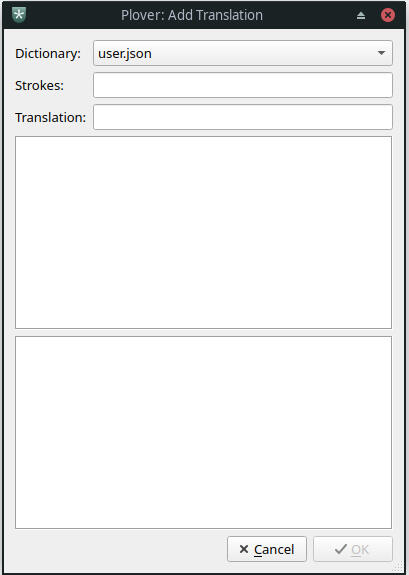
There are two ways to look up words with the “add translation” menu:
If you enter an outline into the "Strokes" bar it displays translations for that outline.
If you type text into the "Translation" bar it displays all of the steno strokes that yield that text.Naturally, you can also use the "Add translation" menu to add translations to your dictionary. Just press Ok with an outline in the "Strokes" bar and text in the "Translation" bar.
It is convenient to be able to use the "Add Translation" menu without needing a mouse. The following outlines will help you do that:
FSOA shortcut for the "tab" key
FSROA shortcut for the "escape" key (cancels out of the menu)
And also recall:
FSR newline (confirms adding a translation in the menu)
TROAU open the "Add Translation" menu
Exercise 302
Open the "Add Translation" menu and perform the following tasks:
Look up the outline for the word 'feather'.
Look up what the outline
TSE/DMOEtranslates into.
Depending on where you're from, add one of these entries to your user.json dictionary:
MU/MmumMO/Mmom
It is very important to gain familiarity with this menu as looking up and adding entries to dictionaries is vital for any practitioner of stenography.
Here are a few reasons why you may want to add your own entries:
To use words specific to a niche subject area or names of people you know.
You might disagree with my opinion on how a word is pronounced, and want to put in a different entry for it.
To create a brief for a word you use often so you can use fewer strokes for it.
To change the way conflict resolution works for a set of conflicting words.
Tools for Practice
Entering text into a document is fine, but there are a few available tools specifically for practicing stenography. I like Steno Jig personally.
When using Steno Jig, I would recommend disabling the timer and live wpm count because they are distracting, and disabling the hints because they won’t display Feather keys.
Exercise 303
Go on Steno Jig, paste the following line into the “custom text” section, tick “Shuffle words”, set Repeats to 3 and use it to see how well you remember the mandatory briefs from last time:
to of do so or a at as am I it if is
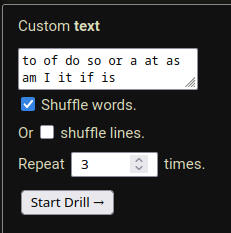
Experiment with different methods and tools for practice and see what works best for you!
New Mandatory Briefs
There will be some of these in every lesson from now on. Be sure to stay on top of practicing them!
OA = 'o' briefs:
FROA fromOAEU = 'i' briefs:
TSOAEU its
DOAEU did
OAE = 'ay' briefs:
DOAE day
MOAE may
SOAE sayOAEU = 'y' briefs:
MOAEU my
Misc. vibes-based briefs:
T out
FR for
TR right
Summary
In lesson 3 we covered:
Consonant clusters
The "Add Translation" menu
Steno Jig
Mandatory briefs: from its did day may say my out for right are
Exercise 304
Practice the following sequences of words:
did my out day right say for are may from its
a if so or do of is to it I at am as
are from right to for say day is do out my of at did so its am may as it I or a if
Exercise 305
Practice the following sequences of words:
fist stiff stir star stair rest ism fast stood smut
dart drat fort drum dorm surf frat turd trim dress
sift tuft oft deft rift
frost drift stress midst smart strut trust
Exercise 306
Practice the following phrases:
I stood at my drum
did I say if it is day out
drift right from off of a rift
for its start I may fart
4 – Longer words
⚠️ this lesson is under construction
Writing multi-syllable words in Feather doesn't require learning any new rules in and of itself.
Exercise 401
Write the following words:
ME/REU/T merit
A/SE/T asset
FE/TU feta
SU/MEU/T summit
MEU/FSEU/T misfit
DEU/TSRU/TS distrust
E/FU/TR effort
TRO/MU trauma
DEU/SA/TSU/R disaster
SA/TEU/REU/TS satirist
Weak Vowels
So, the English language has a concept of "stressed" and "unstressed" syllables. The same combination of consonant and vowel sounds in the same order can end up being pronounced differently. Think about the difference in pronunciation in these pairs:'apple' vs 'a pull'
'insight' vs 'incite'
'desert' vs 'dessert'
'record' (noun) vs 'record' (verb)There are multiple degrees of stress
Summary
In lesson 4 we might cover:
Multi-syllable words
Weak vowels
'ou', 'ea', and silent 'e' disambiguators
Punctuation